Features How it works Pricing FAQ Sign in Start free trial
For physios · biokineticists · personal trainers

Everything that happens
after the session.

Clients, programmes, bookings and invoices in one place — built for South African practices, priced in rand, and set up in an afternoon.

Start your free trial → See how it works

30 days free · No credit card · Works in your browser, on any device
titionershub.com/app
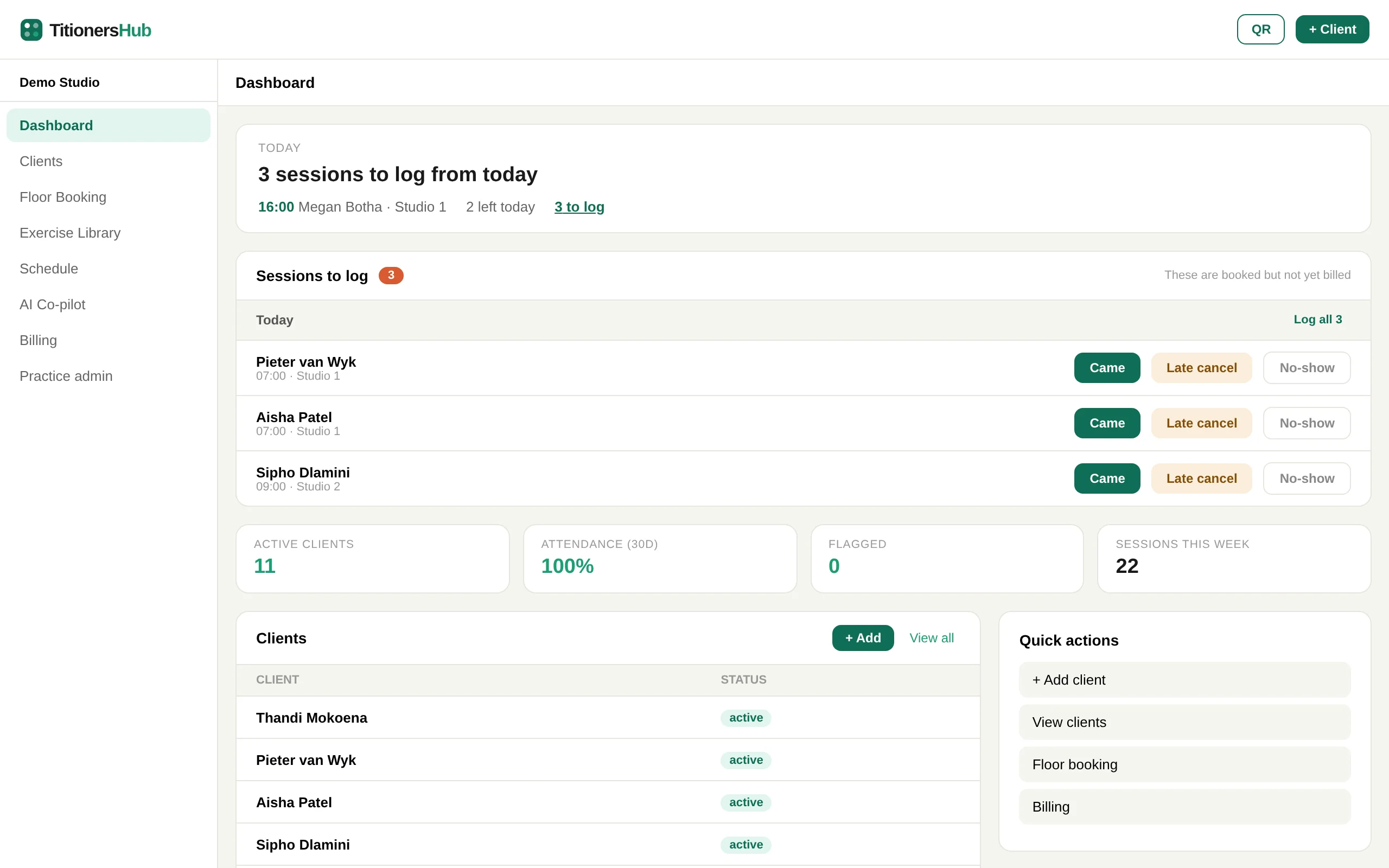
The TitionersHub dashboard: today's next client, sessions waiting to be logged, and clients at a glance
What's included

One place for the whole practice

No more spreadsheet for clients, notebook for bookings and a separate app for invoices. Everything talks to everything else.

Clients and records
Every client's details, session history and notes in one record. Import your existing list from a spreadsheet, and clients can register themselves by scanning your QR code.
Programmes and progress
Build programmes from 155 built-in exercises. Clients follow them in their own portal — on their phone, with no app to install — and you see what they have done.
Bookings
A drag-and-drop schedule for your rooms and studios.
  • Clients book themselves online, into your real free times
  • A booking link for new clients — share it on WhatsApp or Instagram
  • Two-way sync with Google Calendar
  • WhatsApp reminders the day before
Invoicing and payments
Bill monthly, on the spot, or sell session packages.
  • Invoices go to the client as a PDF on WhatsApp
  • Your Yoco, SnapScan or Zapper link on every invoice
  • Weekly and monthly reports, and exports for your accountant
Medical aid ready
ICD-10 codes, your HPCSA practice number and VAT where it applies, on every invoice your clients claim with. What's covered →
Private by design
Each practice's records are walled off from every other. Clients sign in with their own code. Built around POPIA, and you can export everything at any time.
AI Co-pilot
Ask for exercise progressions, treatment ideas or a second opinion on a programme, between clients.
When you choose a client, the AI sees only an anonymous summary — condition, programme week and pain score. Never their name, contact details or date of birth.
Pain and progress
See how each client is really doing.
  • A pain score with every session, on the client's record
  • Clients rate pain after their home exercises
  • Your dashboard flags anyone reporting high pain, missing sessions or not seen in a month
Messages with clients
Clients message you from their portal and you reply from their record — the conversation stays with their file, not in your personal WhatsApp. New messages show on your dashboard.
How it works

From booking to paid, without the admin

The real TitionersHub, shown with a demo practice.

1
Clients book themselves
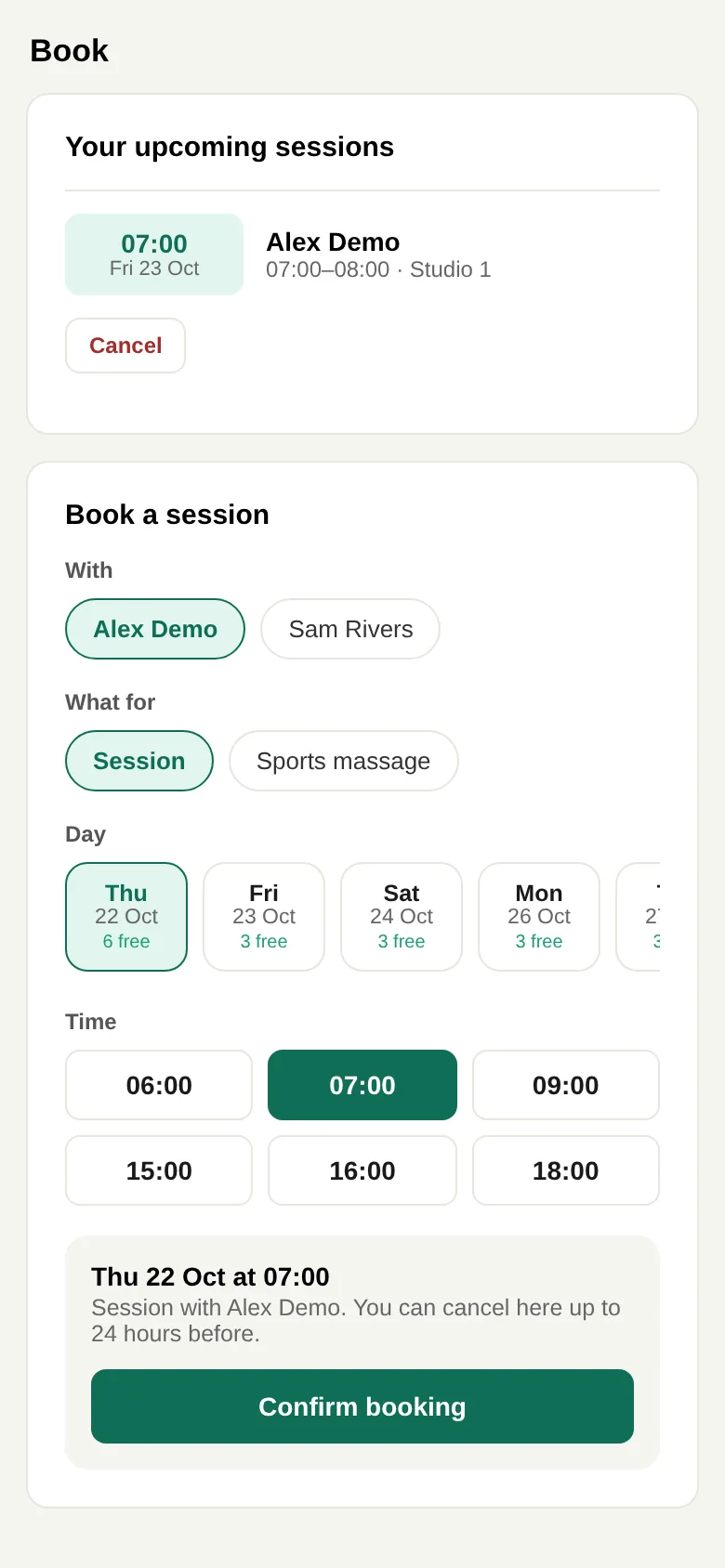
You set your hours once. Clients open their portal, pick you, a day and a time, and it lands in your schedule and your Google Calendar. They can only see times you are genuinely free, and they can cancel themselves up to the notice you choose.
A client booking a session in the TitionersHub portal on a phone
2
Log the session in one tap
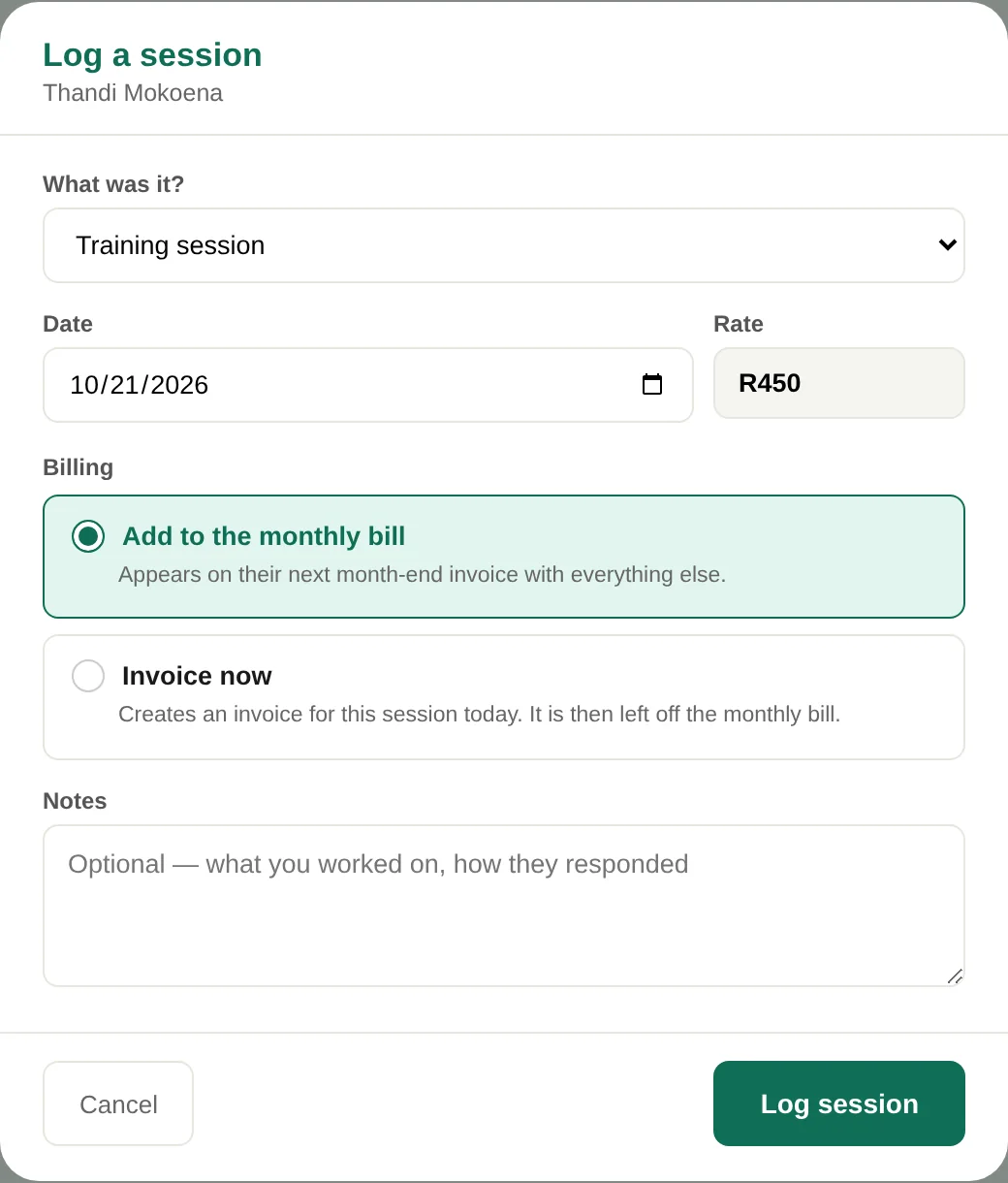
After each session, mark it done — or log several at once at the end of the day. A session on a package comes off the balance automatically. A walk-in can be invoiced there and then.
Logging a session in TitionersHub
3
The invoice goes straight to WhatsApp
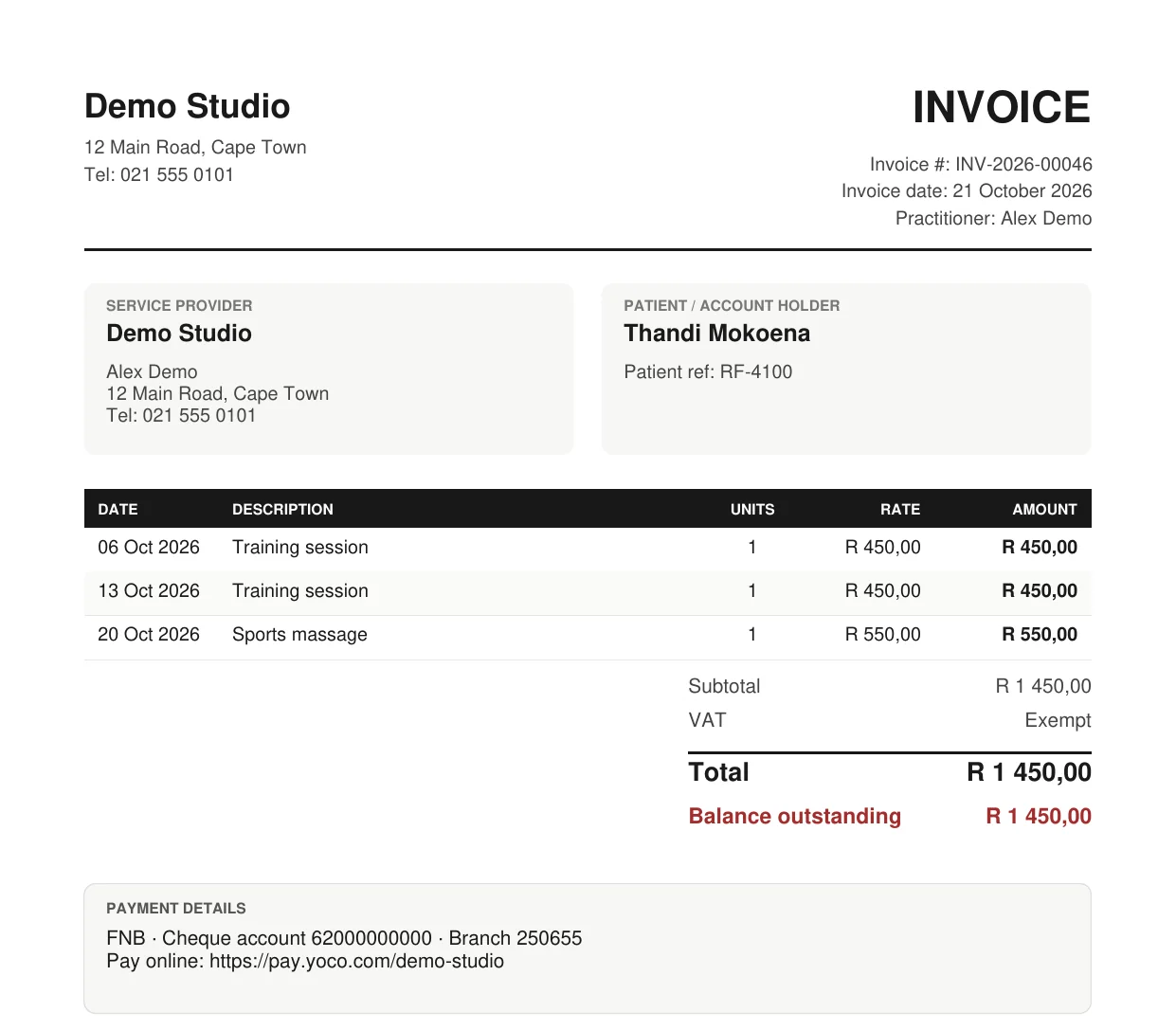
At month end, or on the spot, the invoice is a proper PDF with your details, the sessions, and your payment link. Send it to the client's WhatsApp in two taps, then see what's paid and what's outstanding in your weekly report.
A TitionersHub invoice as a PDF
Medical aids

Invoices your clients can claim with

Most of our practices bill privately and give clients an invoice they claim back with. Here is exactly what that invoice does.

On every invoice

  • ICD-10 diagnosis codes per session, code only — the description is withheld for privacy
  • Your HPCSA or AHPCSA practice number
  • A tax invoice with VAT, if you are VAT registered
  • One invoice per medical aid member, as schemes require
  • Recovery and wellness work kept separate, so it never carries a diagnosis it shouldn't
Built in Cape Town

Made by someone who runs a practice too

TitionersHub is built and supported by Luan Els, who also runs LE Fitness in Cape Town — so it is used on a real practice floor every day, and what gets fixed next comes from practitioners using it.

When you email, you speak to the person who builds it. Luan on LinkedIn →

Pricing

Priced in rand. Less than one session a month.

Every plan has every feature and starts with 30 days free. The only difference is how many practitioners use it.

Solo
Solo practitioner
R299/month
  • 1 practitioner
  • Unlimited clients
  • Every feature included
  • Email support
Start free trial
Most popular
Practice
R599/month
  • Up to 5 practitioners
  • Unlimited clients
  • Every feature included
  • Shared schedule for your rooms
  • Email support
Start free trial
Group
Group practice
R1,099/month
  • Unlimited practitioners
  • Unlimited clients
  • Every feature included
  • Priority support
  • We set it up with you
Start free trial

No card for the trial. No contract — cancel any time.

Questions

Frequently asked

Do I need to download anything?

No. TitionersHub runs in your browser at titionershub.com, on a computer, tablet or phone. Your clients use their portal in their browser too. If you prefer an app on your desktop, there are optional Mac and Windows apps further down this page.

What happens after the 30-day trial?

You choose a plan and pay monthly by card through Paystack. If you don't, your account pauses — nothing is deleted, and you can export your records at any time.

Can I cancel?

Yes, any time. There is no contract and no cancellation fee — email titionershub@gmail.com and it's done the same day.

I already keep my clients in a spreadsheet. Do I start again?

No. Import the spreadsheet — names, dates of birth and contact details — and duplicates are caught for you. Or email it to us and we will move your clients across for you.

I'm a personal trainer — is this for me if I don't bill medical aids?

Yes. When you set up, you tell us what kind of practice you run, and TitionersHub leaves out what you don't need: no practice number, no VAT unless you're registered, no diagnosis codes. Packages, online booking and WhatsApp invoices work the same for everyone.

How do my clients pay me?

Straight into your account. Add your Yoco link or your SnapScan or Zapper QR, and it appears on every invoice. TitionersHub never handles your clients' money.

Is the AI Co-pilot safe to use with client information?

It is built so you don't have to share any. When you choose a client, the AI receives only an anonymous summary — their condition, programme week, latest pain score and number of sessions — never their name, contact details or date of birth. Don't type identifying details into your questions, and treat its answers as suggestions: your clinical judgement always comes first.

Where is my clients' information kept, and who can see it?

In an encrypted cloud database, with each practice's records walled off so no other practice can see them. Clients see only their own information, after signing in with their code and date of birth. You control which practitioners in your practice have access, and you can export your records at any time.

Prefer a desktop app?

TitionersHub works fully in your browser. If you'd rather have it in your dock or taskbar, the desktop apps are the same TitionersHub, with your data in sync.

Try it on your next client

30 days free, no card. Send us your client list and we'll set your practice up with you.

Start your free trial → Ask a question